You might have remembered a thread made earlier this year pondering the differences between Game Boy Advance systems with LCD displays made by Sharp and newer systems with LCD displays made by Panasonic.
I still haven’t gotten to the bottom of it, but it seems likely both companies made screens to the same spec. What is more significant that I was not previously aware of, is the substantial differences in display quality between early GBA systems that shipped with a 40 pin LCD ribbon cable, and later systems with a 32 pin LCD ribbon cable.
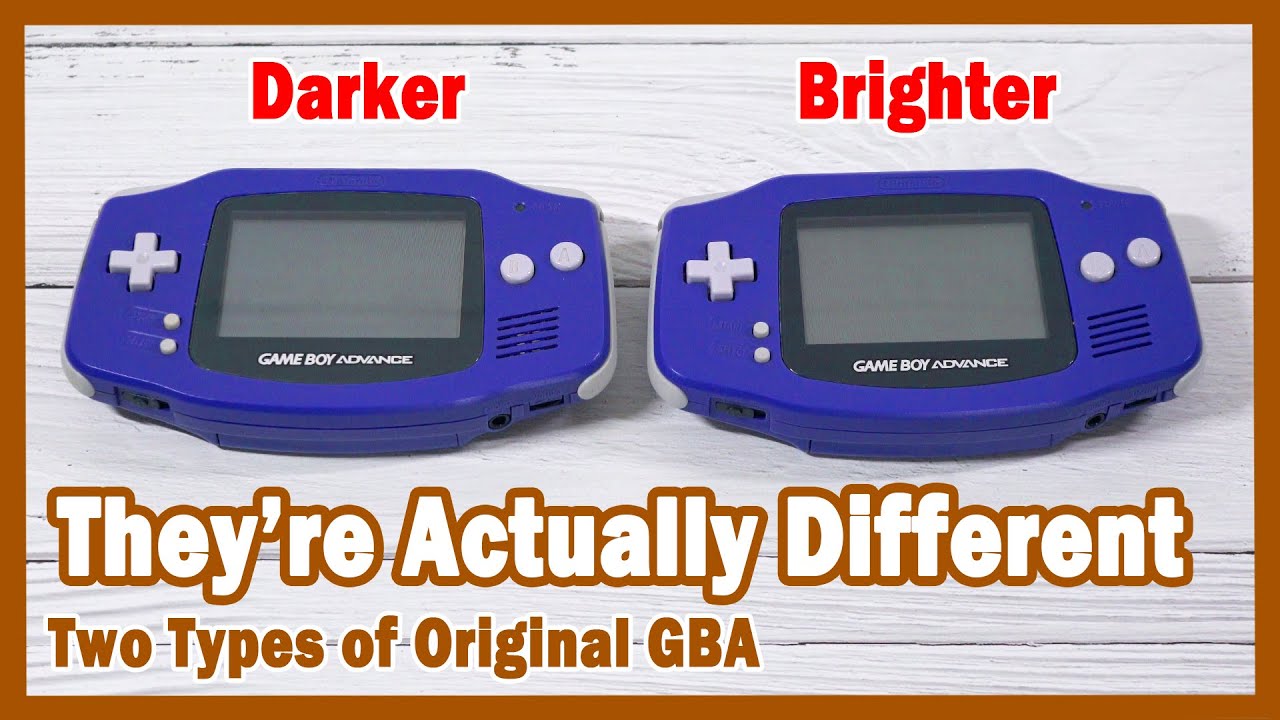
The early 40 pin GBA boards had much better screens, brighter/clearer reflective backs due to different polarizers used with panels for the more common 32pin boards.
Comparison picture, out of 20 something systems in this lot I got a few years ago, all the 40pin panels were nicer than the 32pin ones, all 32pin ones were darker and with a warmer less neutral polarizer tint. The polarizers are different, you can tell by how they react if you face the GBA against an LCD (polarized light) and turn the system around, the polarizer behavior between 40 and 32pin is different.
Conclusion: The polarizers are better in the 40 pin systems.
Hear, hear! I was baffled when I saw Digital Foundry claim the Steam Deck OLED was the most significant mid-generation hardware upgrade ever…despite the welcome display upgrade it’s basically the device Valve should have launched with.
The Game Boy Advance on the other hand was a complete overhaul, it’s crazy to me that it’s the same thickness as a GBA when folded, it brought a new design language to the table, it added built-in rechargable batteries, it was Nintendo’s first system with higher quality clicky microswitched buttons and D-Pad, there’s the front-light…there’s a reason it won a good design award in its launch year.
I still remember my kid brain being blown away by that frontlight, it opened up so many new places to play which were previously off limits.
Now this one is odd, as the colour profile differs. The launch GBA seems to exhibit brighter hues for yellows, but the rest of the colour gamut is similar. No weird oversaturation. Maybe this is why FF Tactics Advance has LCD A and LCD B video options.
Finally, the SP has wider viewing angles - dark scenes are visible from more angles, whereas on the original GBA the colours invert to black from the lower-right side
This makes sense as it’s easier to angle a GBA in that way, compared with the flip-top SP. Both screens have the same clear response times, though the GBA exhibits noticeable flicker in some scenes if you look for it.
So not the slam dunk I was expecting, but interesting nonetheless…
Yes I checked today and my AGB is a 40pin! No wonder it is so much brighter than my ags-001.
My ags is not only less bright, the gamma is lower so it looks somewhat black crushed, and the gamut is way smaller, so red looks like orange.
It’s really quite incredible how vast screen revisions can be on nintendo handhelds.
It’s possible that the gamefaqs post was just wrong, or there is even more nuance and complications to gba screen revisions we don’t understand.
The best way to figure it out would probably be to buy one of those yahoo junk auctions of like 20 broken gbas and hook up each screen and compare them, but im not exactly made of money rn.
The difference in quality between my agb and ags is massive with the agb being so much better, so there must be different revisions of screens in the SP as well with widely differing quality.
Also was I the first one to dig this stuff up? I legit don’t remember anymore, I remember talking to somebody in a reddit thread about this and then posting it here so might not of been me.
Somehow missed this thread. It’s wild because earlier this year I was hunting down another 32-pin, which for me is the best overall screen. I’ve also observed the AGS looking darker as you have, MORALS as well as the optimal angle of light being different between AGB and AGS.
picket up a 40 pin model in good condition, and the screen really does look great in good lighting
but that lighting reveals a sort of interlacing flicker. I’ve fixed this before on my AGS-001, thankfully it didn’t need opening up. does anybody know where the potentiometer is on the AGB-001?
managed to figure it out. first adjustment I overdid it, the next time I played the picture was too washed out and now jittering wildly not just the interlacing effect. turned it a tad counterclockwise and boom, no jittering and a superb picture. wow