@poptart WOW
the vintage PCs, the minidiscs, the outboard ipod dock, the sheer considered use of space across the entire setup, the versatility… I love this so much. Thank you for sharing!
@poptart WOW
the vintage PCs, the minidiscs, the outboard ipod dock, the sheer considered use of space across the entire setup, the versatility… I love this so much. Thank you for sharing!
Some serious Tetris in that nook, looks like a fun place to spend some time!
Commodore 1201 drool
Very nice setup, I love the integration of all the CRTs.
This thread getting updated is always the best.
That looks like the perfect place to play. I love it.
Those look like real authentic consumer grade CRTs. Do you use all of them?
Screens are (from top to bottom, left to right):
70s black and white TV, good for really old stuff
Monochome (Orange) Commodore monitor
Monochome (Green) monitor (good for Game Boy)
Sony PVM for RGB stuff
Rank Arena (NEC) which looks great with VHS.
Okay here is a big setup question. I have always played around with different options for TATE games. At first I flipped my tube around, then later on I built my full wall-sized setup and had one screen rotated permanently.
Now I am looking to downsize my setup again before I move next year, basically to a 27" CRT TV and one VGA CRT.
I’m also thinking of adding a third set, a (15") JVC monitor, which would be a good reference set but also my go-to for TATE games. So my question is, has anyone ever seen any solution for having a CRT in a rotating mount that would make it easy to flip for TATE games? I’ve never heard of anything like it and it is probably a pipe dream but I thought I’d ask.
I’m sure you could DIY something with the bearing from a front-loading dryer but I can’t think of anything that would be remotely elegant.
I looked around a couple months ago and didn’t find anything. It was by no means an exhaustive search though. DIY or modifying an off the shelf mount like used in restaurants and bars when CRT’s were still the leading tech might be the only solutions.
I considered DIY, but I don’t play enough TATE games on CRT to actually do something, lol. I didn’t come up with anything remotely elegant either. I was considering building a box to put the CRT in with a bracket on the back and mounted to the wall, or a stand, with a track. Then I would rotate the CRT by moving the track. A poor man’s rack and pinion, lol, as the video I found called it when I was looking for ideas:
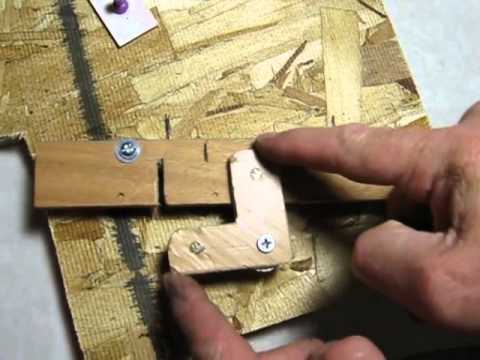
I haven’t. I imagine it would have been a tough sell even prior to flat screens since rotating the display screws with the picture if done while the set is on. I imagine no mount manufacturers would want to take the risk of damaging their consumers’ displays. Plus, as far as I know, there just wasn’t any application for such a thing outside shmups which were always a very niche thing.
Just did a bit of tidying of my TV unit. Mainly to move a few bits out of reach of our littlest one.
I thought about getting a mount plate for the back of the TV and then mounting my little Asus on it. But the Asus mount holes are a bespoke distance 85mm and hard to find a fitting adapter (should have come with PC but mine was a hand-me-down) so I gave up on that.
Instead I bought a pack of heavy duty Velcro! I’ve used it to mount the following on the back of my 20" Philips LCD:
As much as it pains me to not do this the “proper” way the flexibility of this Velcro approach wins.
Having these things fixed in place and easily reachable is a real improvement.
Are you sure it’s not 75mm? Vesa mounts are pretty common in 75mm and 100mm.
If not, you could probably adapt it yourself by buying a 75mm one and a little piece of steel from a hardware store and drilling 85mm holes.
Yes, definitely 85mm. It’s the holes on the bottom of the PC for bolts for the bespoke mount plate (below, that I don’t have; the keyholes are to accept the bolts on the bottom of the PC) which as you can see has 75mm and 100mm holes for Vesa mounting to whatever.
Anyway, all sorted now with £3 worth of Velcro!
So I thought I’d just post an update on a fun weekend project I had with my Dad - I didn’t have a chance to spend much time with him last year because of the pandemic. Anyway with things settling down here (somewhat) I figured a rolling cart for my consoles would be fun to put together over a few beers. The entire thing is on castors with the power boards mounted to the rear - definitely made a lot of mistakes along the way but I’m pretty happy with the result.
Super cool set up! I love having my Consles and AV gear on a cart. Makes it super easy to tinker with things and add/remove them as needed. What is the devide that you have on the upper portion of the side?
How did you mount the surge protectors on the back? Looks very handy! I may try to do something like that too.
Neat idea! Where do you plan on rolling it to? I really like the idea of a complete setup you can put away when not in use, depending on how you have things set up of course.
I had a 20inch TV on a table on castors for a while, and rolled it over to my couch for PS2 play mostly. It didn’t end up working out so well, over time I just wanted to play PS2 on my normal big screen or at my desk on a 14inch CRT. But I’ve been keeping the idea in my head for future use. I have half a mind to get an audio/server rack and rackmount a screen.
@Danexmurder Thanks! - that’s the reason I did it, I just spin it around when I need to manage cables or swap a system in or out. As for the divide on the side, I’m not quite sure what you mean - it’s probably just the angle of the photo, it is really just three ply shelves. It’s only that deep to accommodate (and provide adequate support for) the PVM. I want to pick up a lazy suzan at some stage so I can spin the monitor to face my desk, but it would require me to redo my cabling and I probably won’t bother until I eventually pick up something like a gscart that I can mount to the back of the monitor.
@Peltz It’s really easy actually - most (if not all) surge protectors have keyholes for screw heads on the back, so all you do is note their position, fix some screws to the mounting surface and then just hang the board on the keyholes. Super easy.
@poptart So I did it for three reasons - the first was just ease of access, I can just spin it around and access what I need. The second is that my office will eventually become a guest room, by putting this on castors I can easily tuck it away out of sight when we have people over. Finally the third is when I have friends over I can easily wheel it out into the living room. I should add that it’s currently next to the desk in my office so it’s already in an ideal place for me to pick up and play.
I didn’t take a picture of the cable setup to the wall, but there are two leads coming from the power boards and that is it. Both leads are hooked up to smart switches which are always off unless I’m playing a game.
I like how you organized the consoles by generation.


